Git workflows
Gitflow for large teams: branching, releases and hotfixes
A practical guide to using Gitflow in large engineering teams: branch roles, step-by-step commands, release and hotfix process, CI rules and common mistakes.
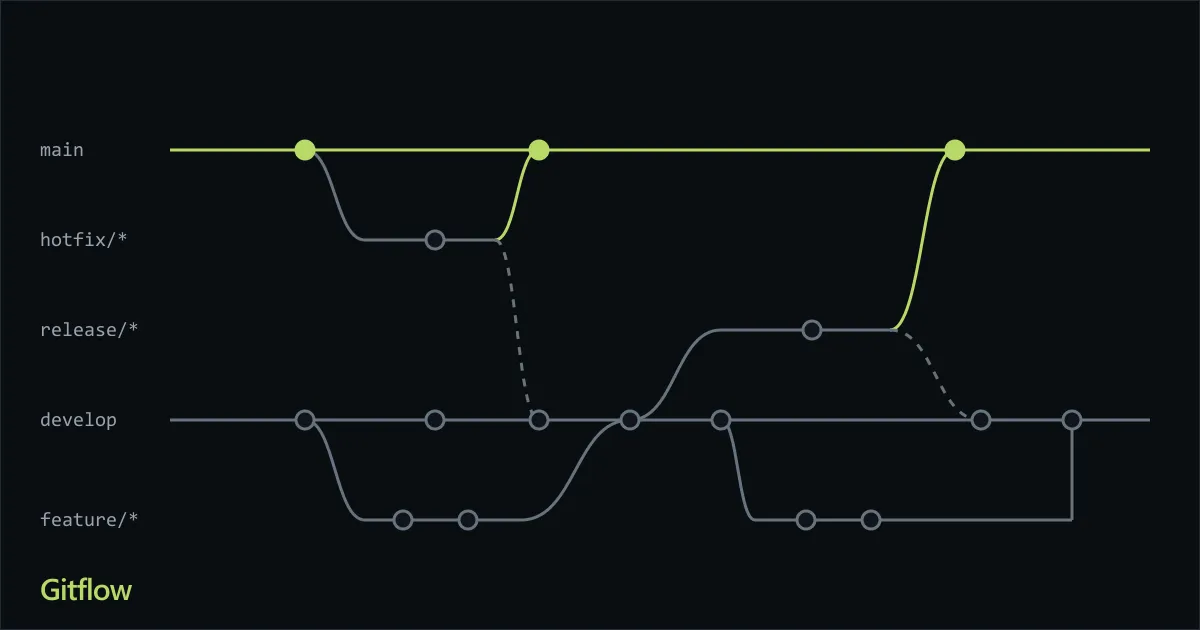
Gitflow is a Git branching model that gives every kind of work its own branch and a fixed path to production. Developers branch new work from develop, release candidates are cut into release/* branches, and only released code reaches main. For teams of dozens of engineers that ship versioned software on a schedule, that predictability is the whole point.
This guide explains how Gitflow works, the exact commands for each step, and the rules that keep it healthy when many people use it at once. It is based on the model introduced by Vincent Driessen and the Atlassian Gitflow tutorial, extended with the team-scale practices we apply on production projects.
When Gitflow fits and when it does not
Gitflow was designed for software with explicit versions: products that are installed, shipped to app stores, delivered to customers on contract, or supported in several versions at once. It works well when:
- You release on a cadence (every two weeks, monthly, quarterly) and not on every merge.
- A QA or UAT stage must validate a frozen candidate before production.
- You maintain older versions and need to patch them.
- Many teams contribute to one codebase and need a clear integration point.
It is a poor fit when you deploy a web service several times a day. In that case the long-lived develop branch and the release ceremony add delay without adding safety, and trunk-based development is usually better. Choose the workflow your release process needs, not the one that is fashionable.
The five branch types
Gitflow has two long-lived branches and three kinds of short-lived ones.
| Branch | Lives | Created from | Merges into | Purpose |
|---|---|---|---|---|
main |
forever | n/a | n/a | Only released, production-ready code. Every commit is a tagged version. |
develop |
forever | main (once) |
n/a | Integration branch for the next release. Always buildable. |
feature/* |
days | develop |
develop |
One change: a story, a bug fix, a refactor. |
release/* |
days to weeks | develop |
main and develop |
Stabilise a version: bug fixes, version bump, release notes. |
hotfix/* |
hours to days | main |
main and develop |
Urgent fix for production that cannot wait for the next release. |
Two rules hold the model together:
- Nobody commits directly to
mainordevelop. Every change arrives through a pull request. mainalways matches what is in production. If you can tag it, it is a release.
Step-by-step workflow
1. Set up the long-lived branches
Start from main and create develop once:
git switch main
git switch -c develop
git push -u origin develop
2. Build a feature
Branch from the latest develop, name the branch after the ticket, and keep it small.
git switch develop
git pull --ff-only
git switch -c feature/PAY-142-refund-flow

# work, commit in small steps
git add -p
git commit -m "PAY-142: add refund request endpoint"

git push -u origin feature/PAY-142-refund-flow
Open a pull request into develop. When it is approved and CI is green, merge it, then delete the branch:
git switch develop
git pull --ff-only
git branch -d feature/PAY-142-refund-flow
A feature branch should live for days, not weeks. The longer it lives, the more it diverges from
developand the more painful the merge becomes.
3. Cut a release
When develop contains the scope of the next version, create a release branch from it. From this moment develop is free to accept work for the version after this one.
git switch develop
git pull --ff-only
git switch -c release/1.4.0
git push -u origin release/1.4.0
On the release branch you only do release work: bump the version, update the changelog, and fix bugs found by QA. No new features. Each fix is a small commit or pull request into release/1.4.0.
4. Ship the release
When the candidate is approved, merge it into main, tag it, and merge it back into develop so the fixes made during stabilisation are not lost.
git switch main
git pull --ff-only
git merge --no-ff release/1.4.0
git tag -a v1.4.0 -m "Release 1.4.0"
git push origin main --tags

git switch develop
git pull --ff-only
git merge --no-ff release/1.4.0
git push origin develop

git push origin --delete release/1.4.0
git branch -d release/1.4.0
Use --no-ff for these merges so the history keeps a merge commit that shows which commits belonged to the release. In a team setting these merges are normally pull requests, not local commands, so branch protection and CI still apply.
5. Handle a production hotfix
A critical bug in production cannot wait for the next release. Branch from main, fix it, and merge it to both long-lived branches.
git switch main
git pull --ff-only
git switch -c hotfix/1.4.1

# fix the bug, commit, open a pull request into main
git commit -am "Fix rounding error in invoice totals"

git switch main
git merge --no-ff hotfix/1.4.1
git tag -a v1.4.1 -m "Hotfix 1.4.1"
git push origin main --tags

git switch develop
git merge --no-ff hotfix/1.4.1
git push origin develop
If a release/* branch is open at that moment, merge the hotfix into the release branch instead of develop. The release branch will carry it into develop when it closes.
Scaling Gitflow to large teams
The commands above are the same for three people or three hundred. What changes at scale is how much discipline you need around them.
Protect the long-lived branches
Configure your Git host so the rules are enforced by the platform, not by memory:
- Block direct pushes and force pushes to
main,developandrelease/*. - Require at least one approving review, and two for
mainandrelease/*. - Require status checks (build, tests, lint, security scan) to pass before merging.
- Require branches to be up to date with the target before merging, or use a merge queue.
- Use a
CODEOWNERSfile so changes to sensitive areas request the right reviewers automatically.
# .github/CODEOWNERS
/payments/        @acme/payments-team
/infra/           @acme/platform-team
*.sql             @acme/data-team
Standardise branch names and commits
Predictable names make branches searchable and let automation act on them. Pick one convention and enforce it with a server-side rule or a CI check:
feature/<TICKET>-<short-description>   feature/PAY-142-refund-flow
release/<major.minor.patch>            release/1.4.0
hotfix/<major.minor.patch>             hotfix/1.4.1
Reference the ticket ID in each commit message or pull-request title. It links code to the work item and makes the changelog easy to generate.
Run different CI per branch type
Not every branch needs the same pipeline. A common split:
| Event | Pipeline |
|---|---|
Pull request into develop |
Build, unit and integration tests, lint, static analysis |
Merge into develop |
Everything above, then deploy to the shared development or staging environment |
Push to release/* |
Full regression suite, deploy to QA or UAT, performance and security checks |
Merge into main |
Build the release artifact once, tag it, deploy to production |
# GitHub Actions: trigger rules per branch type
on:
  pull_request:
    branches: [develop, main, 'release/**']
  push:
    branches: [develop, main, 'release/**', 'hotfix/**']
Build the artifact once on the release branch and promote that same artifact through environments. Rebuilding for production means you ship something you did not test.
Assign a release owner
In a large team a release needs one accountable person: a release manager, or a rotating role among senior engineers. This person opens the release branch, controls what is allowed into it, coordinates QA sign-off, and performs or approves the merge to main. Without a named owner, release branches drift and fixes get lost.
Keep feature branches short with feature flags
The biggest cost of Gitflow at scale is long-lived feature branches that collide with each other. Break large work into slices that can merge in days, and hide unfinished behaviour behind a feature flag so incomplete code can safely reach develop and even production:
if (flags.isEnabled('refund-flow')) {
  registerRefundRoutes(app);
}
Merge develop into long-running feature branches regularly (or rebase them if your team agrees on rewriting private branch history), so conflicts surface early and in small pieces.
Automate versioning and the changelog
Use Semantic Versioning: MAJOR.MINOR.PATCH. Releases bump the minor (or major) number, hotfixes bump the patch. Generate release notes from merged pull requests or from Conventional Commits so no one writes them by hand at the last minute.
Support more than one version
If customers run older versions, keep a support/1.x branch cut from the last 1.x tag on main. Apply fixes there with the same hotfix process and tag them (v1.9.4). Keep this list short; every supported version multiplies your testing effort.
Common mistakes
- Letting
developbreak. Ifdevelopis red, every engineer is blocked. Fix or revert first, investigate second. - Adding features to a release branch. It turns a stabilisation step into a second development line. Anything new waits for the next release.
- Forgetting the back-merge. A fix that reaches
mainbut notdevelopreturns as a regression in the next release. Automate the back-merge or make it a release checklist item. - Long-lived feature branches. Weeks of divergence mean painful merges and late integration bugs. Slice the work and use flags.
- Squash-merging release and hotfix branches. It removes the shared history that makes later merges between
mainanddevelopclean. Squash feature branches if you like; keep merge commits for the long-lived ones. - Different builds per environment. Promote one artifact; do not rebuild per stage.
- Applying Gitflow to a continuously deployed service. See the next section.
How Gitflow compares with other workflows
| Gitflow | GitHub Flow | Trunk-based development | |
|---|---|---|---|
| Long-lived branches | main, develop |
main |
main (trunk) |
| Release mechanism | Release branches and tags | Deploy from main after each merge |
Deploy from trunk, often behind flags |
| Best for | Versioned products, scheduled releases, multiple supported versions | Web apps with continuous delivery | High-maturity teams with strong automation |
| Integration frequency | Per feature, to develop |
Per pull request | Many times a day |
| Complexity | Higher | Low | Low process, high engineering discipline |
None of these is universally correct. Many organisations use Gitflow for their mobile apps and on-premise products and trunk-based development for their internal web services.
Gitflow checklist for your team
-
mainanddevelopare protected; direct pushes are blocked. - Branch naming and ticket references are enforced automatically.
- Every pull request needs review and green CI.
- Feature branches live for days, and unfinished work is behind flags.
- One named owner is responsible for each release.
- Release branches accept fixes only, never new features.
- Every release and hotfix is tagged and merged back into
develop. - One artifact is built per release and promoted through every environment.
- Release notes are generated from merged work, not written from memory.
Frequently asked questions
Is Gitflow still relevant?
Yes, for the right kind of product. The model is a poor match for teams that deploy continuously, which is why many of them moved to trunk-based development. For versioned software with release cycles, QA gates and supported versions, Gitflow remains a clear and proven structure.
What is the difference between develop and main?
main holds only what has been released and is the source of truth for production. develop holds work that has been integrated but not yet released. Code moves from develop to main only through a release branch.
Should I merge or rebase?
Use merge commits (--no-ff) to close release and hotfix branches so the history shows what shipped when. For feature branches, your team can choose merge, squash or rebase; the important thing is that the choice is consistent and documented.
Do I need the git flow command-line extension?
No. It wraps the same plain Git commands shown in this guide. Many teams skip it and use pull requests with branch protection, because the platform then enforces review and CI on every merge.
Further reading
- Atlassian, Gitflow workflow
- Vincent Driessen, A successful Git branching model
- Semantic Versioning 2.0.0
- Conventional Commits